Published September 7, 2026
How a website decides which AI crawlers get in
Before an AI assistant can read a page, four checks run in the first few hundred milliseconds: IP reputation, request headers, a JavaScript challenge, a rate limit. Any one can turn it away, and 22.6% of the top 10,000 sites turn at least one AI crawler away on purpose. What each check does, why a shop can be invisible without knowing it, and how to find out.
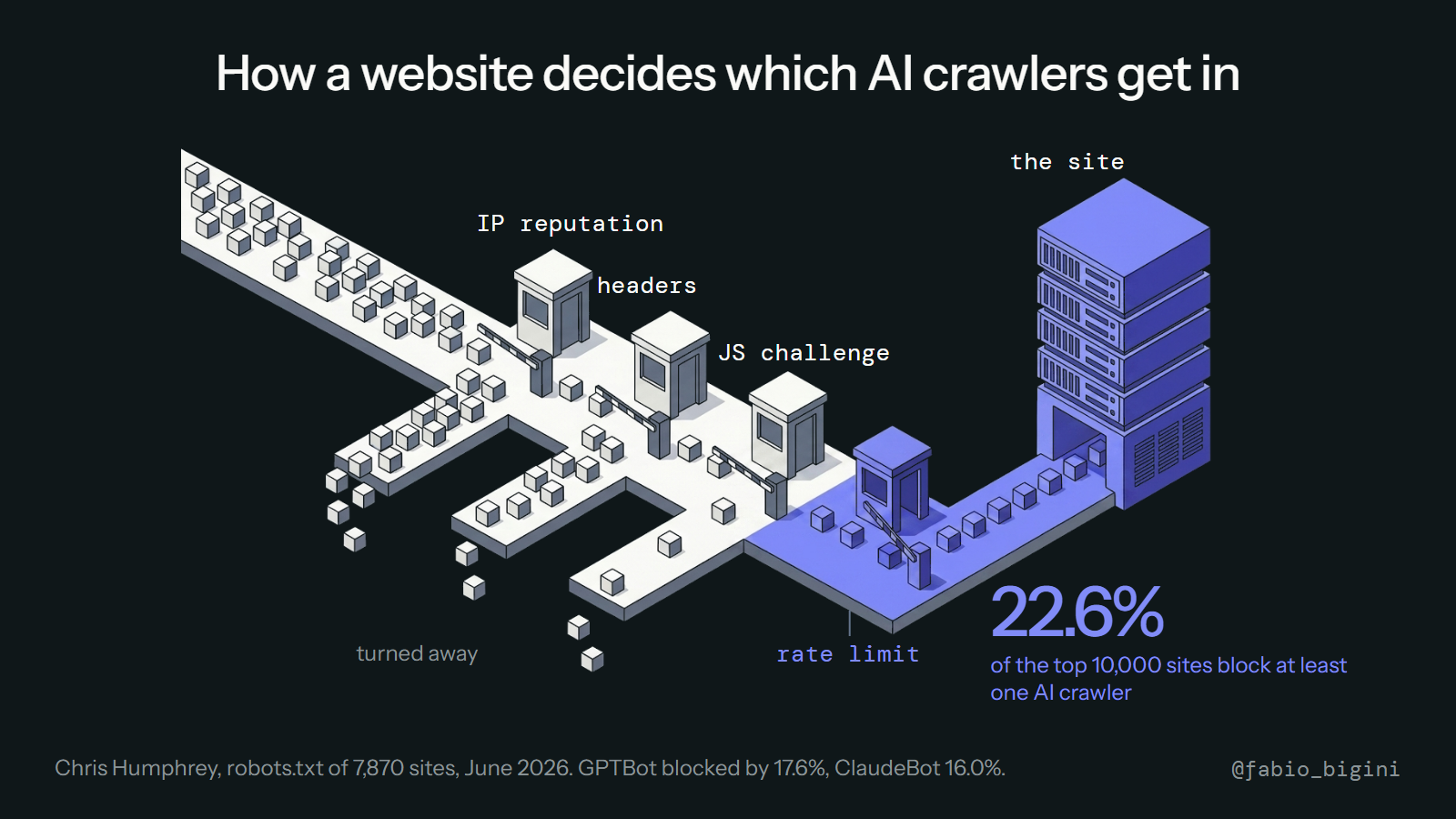
When an AI assistant reads your product page, it does not open a browser and look at it. It sends a request, like any crawler, and your hosting stack decides in a few hundred milliseconds whether to answer. Most shop owners have never seen that decision, and a growing number of sites make it against the AI crawlers without anyone in the business knowing.
Here are the four checks, in the order a request meets them, and what the numbers say.
The four gates
1. IP reputation. Before your server sees anything, a CDN or bot-management layer (Cloudflare, Akamai, DataDome and the like) looks at where the request comes from. Known crawler ranges get a label. Some are allowed, some are challenged, some are dropped. This gate runs on the network provider's rules, which are often the defaults.
2. Request headers. Every crawler introduces itself with a user-agent string: GPTBot, ClaudeBot, PerplexityBot, Google-Extended. Your robots.txt file, and any header-based rules, say yes or no per name. This is the only gate you fully control with a text file, and the one the study below measured.
3. JavaScript challenge. If the layer is unsure, it serves a small script the visitor must run before the real page loads. Browsers do it invisibly. Most AI fetchers do not run JavaScript, so the challenge is a wall: the assistant receives the challenge page, not your product page, and moves on.
4. Rate limit. Even an allowed crawler that asks for too many pages too fast gets throttled or cut off. For a crawler reading five pages to answer one question this rarely matters; for a training crawler sweeping a whole catalogue it does, and hosts often set one limit for both.
Any one gate can say no. The assistant does not report a refusal; the answer simply gets built from the pages it could read.
What the numbers say
Chris Humphrey checked the robots.txt of the top 10,000 websites (7,870 with a determinable result) in June 2026 (source):
| Share of top sites blocking it | |
|---|---|
| GPTBot (OpenAI) | 17.6% |
| ClaudeBot (Anthropic) | 16.0% |
| Google-Extended | 14.5% |
| PerplexityBot | 10.4% |
| At least one AI crawler | 22.6% |
That is gate two only. Gates one, three and four are not visible from outside and are, in our experience with shops, more often the reason a page is unreadable: a default bot rule at the CDN, or a JavaScript challenge nobody remembers switching on.
Why this is easy to get wrong
Blocking training crawlers is a reasonable choice: a publisher may not want its text used to train models. But the same block often catches the crawler that reads pages to answer a question right now. OpenAI, for example, uses different names for training (GPTBot) and for live search (OAI-SearchBot, ChatGPT-User); a rule written against "GPT" catches all three. The result is a shop that opted out of training and, without meaning to, out of recommendations.
Hosting platforms make the same mistake on your behalf. Several managed-commerce hosts ship with AI crawlers blocked at gate one or three by default, and the setting sits in a security panel nobody opens.
How to find out in five minutes
- Open
yourshop.com/robots.txtand search forGPTBot,ClaudeBot,PerplexityBot,OAI-SearchBot. ADisallow: /under any of them is gate two saying no. - Fetch a product page with a crawler's user-agent from outside your network (a
curlwith-A "GPTBot"does it). If you get a challenge page, a 403, or an empty shell instead of the product text, one of the other gates is closed. - Ask your host or CDN which bot-management preset is active, and whether AI crawlers are in the blocked list.
None of this needs a developer beyond step two, and the fix is usually one line or one toggle. The reason to do it this week rather than someday is simple: an assistant that cannot read your page cannot compare it, and a product that cannot be compared does not get recommended.